Free for iPhone · Ready in a minute

Log expenses
with your voice.

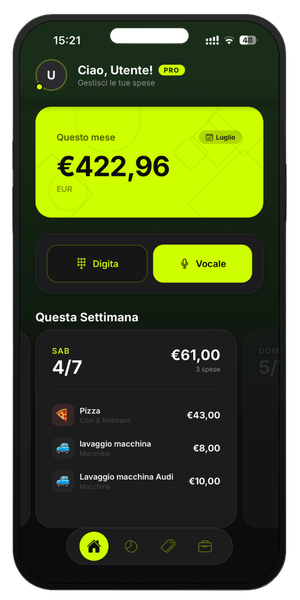
“Pizza with friends, twenty-five dollars.” Say it and you're done: VoceSpesa recognizes the amount and category and saves the expense on your iPhone.

  • Amount and category recognized automatically
  • Dashboards and weekly reports, ready-made
  • Per-category budgets under control
  • Data on your iPhone, cloud backup with Pro
Download on theApp Store
See how it works ↓

Free to download · No credit card required

Voice input

Three seconds, no keyboard.

Say the expense like you'd tell a friend. Speech recognition takes care of the rest.

«»

Amount $25.00 🍕 Food & Restaurants ✓ Saved

It even understands amounts in words and cents: “nine fifty” becomes $9.50.

3 secto log an expense
Offlineworks without a connection
10+categories, custom ones too
300+recognized keywords

Automatic classification

Every expense in its place.

“Pizza” goes to Food & Restaurants, “gas” to Transport. With Pro you create your own categories, with your own keywords.

🍕 Food & Restaurants 🚗 Transport 🏠 Home & Bills 💊 Health 🛍️ Shopping 🎮 Leisure 📚 Education 💼 Work 🎁 Gifts ❓ Other + Yours

How it works

From voice to report, in three steps.

1

Speak

Tap the mic and say the expense. The app transcribes in real time as you speak.

2

Confirm

Check the suggested amount, description and category. One tap and the expense is saved.

3

Analyze

Dashboards, weekly reports and budgets update on their own — no spreadsheets.

Features

Features you'll actually use.

Voice input in English

iOS's native speech recognition engine: fast, accurate, even when you speak quickly.

Keyboard too

In a meeting or at the movies? Type the expense: same flow, same automatic classification.

Automatic classification

Over 300 built-in keywords: the right category on the first try, no menus to scroll.

Clear dashboard

Per-category chart, totals and top expenses. Filters by week, month and year.

Weekly reports

Totals, daily averages and category rankings, week by week. No Excel.

Per-category budgets

Set a monthly limit and watch the bar fill up. Before it's too late.

Your iPhone first, then the cloud

Expenses live in a local database on your device: the app works offline too. And with Pro you can also back them up to the cloud, safe when you switch phones.

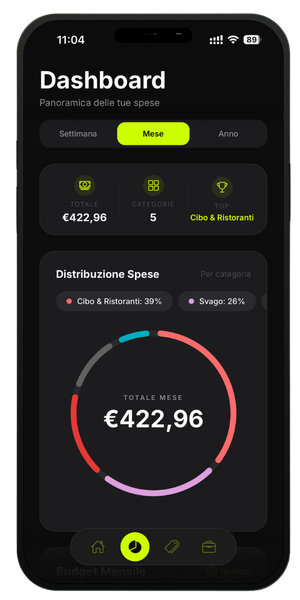
Voce Spesa dashboard with the per-category spending distribution chart

Everything under control.

Where your money goes, category by category, with the time filters you prefer.

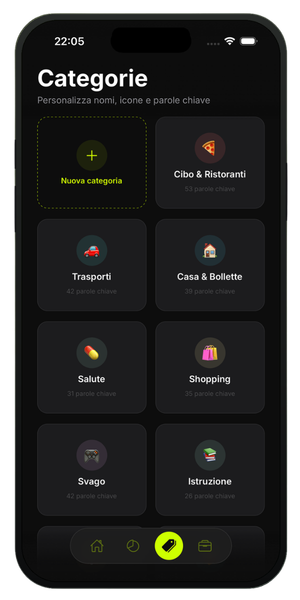
Voce Spesa categories screen with customizable names, icons and keywords

Categories, your way.

Rename, change icons, add keywords: classification that speaks your language.

Pricing

Start free. Go Pro whenever you want.

Free

$0

Forever. To try it for real.

  • 30 expenses a month
  • Voice and manual input
  • 6 categories
  • Monthly dashboard
Download free
Recommended

Pro Yearly

$24.99/year

That's about $2.08 a month — save 48%

  • Unlimited expenses
  • All categories + custom ones
  • Week, month and year filters
  • Full weekly reports
  • Per-category budgets
  • Cloud backup
Go Pro

Pro Monthly

$3.99/month

No commitment: cancel anytime.

  • Unlimited expenses
  • All categories + custom ones
  • Week, month and year filters
  • Full weekly reports
  • Per-category budgets
  • Cloud backup
Choose monthly

Subscription managed by Apple. Cancel anytime from your App Store settings.

FAQ

Frequently asked questions

What is Voce Spesa?

Voce Spesa is an iPhone app that lets you log expenses with your voice: say what you spent and the app recognizes the amount and category on its own, then organizes everything into dashboards, weekly reports and budgets.

Do I need an internet connection?

Only to sign in to your account. Expenses can be logged and viewed even offline: they live on your phone. With Pro you can also enable cloud backup.

Where does my data go?

Into a local database on your iPhone. With Pro you can also save it to the cloud, so you don't lose it when you switch phones.

Does voice recognition really understand English?

Yes: it uses iOS's native speech recognition engine and even understands amounts spoken in words (“twenty-five dollars”) and cents (“nine fifty” becomes $9.50).

What if it gets something wrong?

Before saving you see the suggested amount, description and category: fix them with a tap. Nothing goes into your records without your OK.

Can I use VoceSpesa for free forever?

Yes: the Free plan never expires. It includes 30 expenses a month with voice input, 6 categories and the monthly dashboard, no credit card required.

Can I cancel my subscription anytime?

Yes, at any time from your App Store account settings. Pro stays active until the end of the period you've already paid for.

Is there an Android version?

VoceSpesa is currently iPhone-only. Android is under consideration: if you'd like it, let us know through the support page.
Ready in a minute

Your next expense? Just say it.

Download VoceSpesa, sign in and log your first expense with your voice.

Free · No credit card required